

Skip to content
CONTEXT MAPPER
  • Docs
  • Language Reference
  • Generators
  • News
  • Background
  • Get Involved
    Introduction
    • Welcome
    • Getting started
    • Create CML Project
    • Examples
    • Usage as Library
    • Frequently Asked Questions
    Language Reference (Core)
    • CML Reference - Introduction
    • Language Semantics
    • Context Map
    • Bounded Context
    • Domain and Subdomain
    • Domain Vision Statement
    • Partnership
    • Shared Kernel
    • Customer/Supplier
    • Conformist
    • Open Host Service
    • Anticorruption Layer
    • Published Language
    • Responsibility Layers
    • Knowledge Level
    • Aggregate
    • Tactic DDD Syntax
    • Application and Process Layer
    • User Requirements
    • Stakeholders
    • Value Registers
    • Imports
    Analysis and Design Transformations
    • Rapid Object-oriented Analysis and Design
    • Story Splitting (PoC)
    • Stakeholder and Value Modelling Transformations
    Architectural Refactorings (ARs)
    • Architectural Refactorings
    • AR-1: Split Aggregate by Entities
    • AR-2: Split Bounded Context by Features
    • AR-3: Split Bounded Context by Owner
    • AR-4: Extract Aggregates by Volatility
    • AR-5: Extract Aggregates by Cohesion
    • AR-6: Merge Aggregates
    • AR-7: Merge Bounded Contexts
    • AR-8: Extract Shared Kernel
    • AR-9: Suspend Partnership
    • AR-10: Change Shared Kernel to Partnership
    • AR-11: Change Partnership to Shared Kernel
    Value-Driven Analysis and Design
    • Value-Driven Analysis and Design (VDAD) Support
    Service Cutter
    • Context Map Suggestions with Service Cutter
    • Service Cutter Configuration File (.servicecutter.yml)
    Reverse Engineering
    • Context Map Discovery
    Generators
    • Generators Overview
    • Context Map Generator
    • PlantUML Generator
    • BPMN Sketch Miner Generator
    • MDSL (Micro-)Service Contracts Generator
    • Service Cutter Generators
    • Generic Generator (Templating)
    Tutorials
    • Model Event Storming Results in Context Mapper
    • Event Sourcing and CQRS Modeling in Context Mapper
    • Generate Microservices From Context Map Using JHipster
    • Systematic Service Decomposition with Context Mapper and Service Cutter
    • Validating the Implementation against the Model (with ArchUnit)
    IDE Plugins and Extensions
    • Visual Studio Code Extension
    • Online IDE (no longer supported)
    • Eclipse Plugin
    • Feature Support

    Story Splitting (PoC)

    The Context Mapper DSL (CML) supports capturing user story. Serving as initial input to our OOAD transformations, these stories allow our users to start prototyping an application rapidly. Before you start generating Subdomains and Bounded Contexts in such transformations, you have to create and evolve some use cases or user stories. During this process (in case you work with user stories), you may want to split your stories. Our story splitting transformations based on Patterns for Splitting User Stories support such effort.

    Note: This feature is in "proof of concept" state. It might not be stable and we currently only support one transformation. In the future we may support more Patterns for Splitting User Stories.

    Split Story by Verb/Operation

    As a first proof of concept for this feature we implemented the transformation “Split Story by Verb/Operation”. It splits a CML user story by its verb.

    We illustrate the idea with the following user story written in CML:

    UserStory Account_Admin_Story {
        As an "Admin" I want to "manage" an "Account" so that "can enable users to work with the system."
    }
    

    The Context Mapper editor provides a quick fix on the verb:
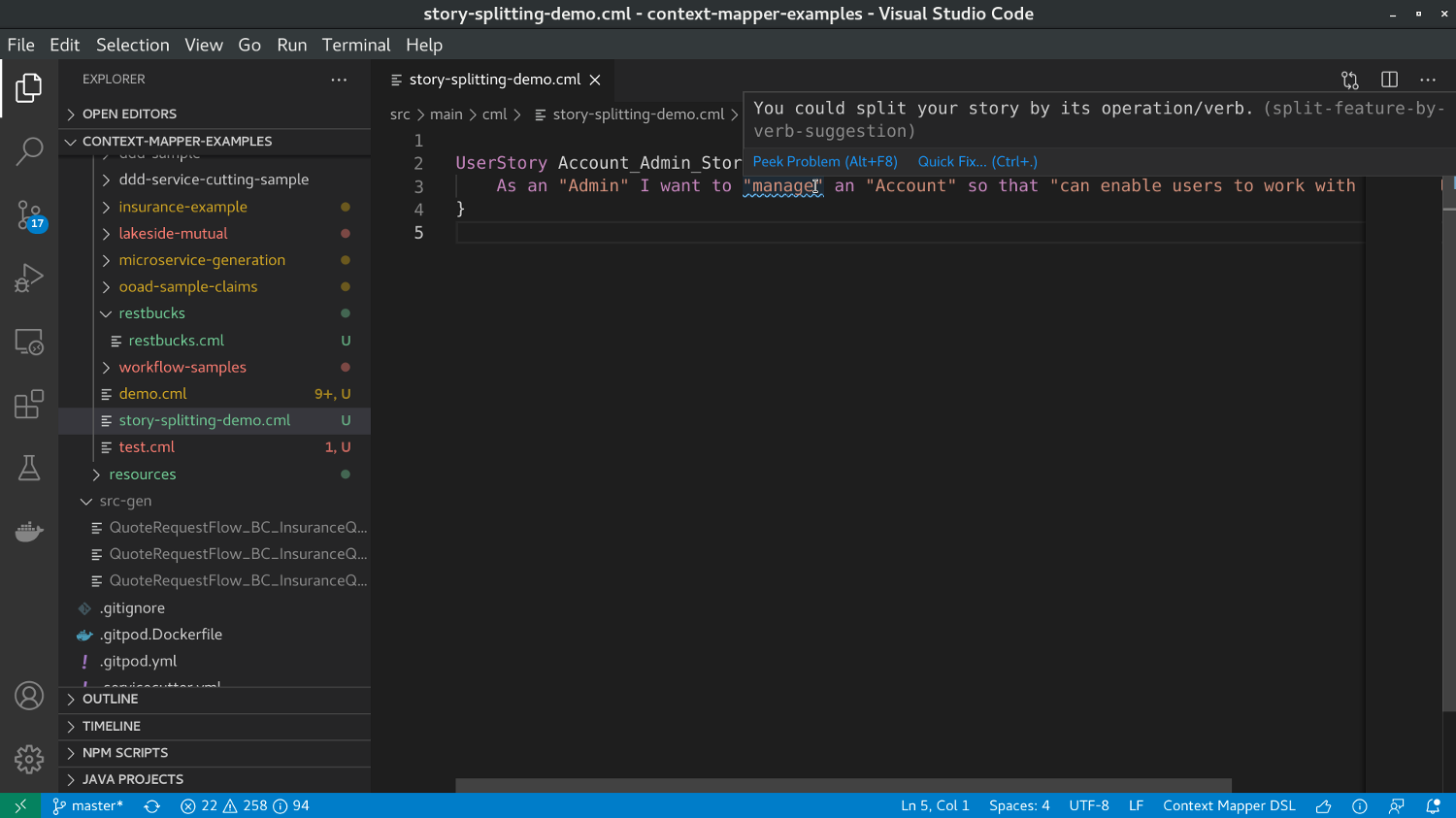
    Story Splitting in VS Code - Example (1)

    By clicking on the verb and then on the light bulb, users can click “Split Story by Verb/Operation”:
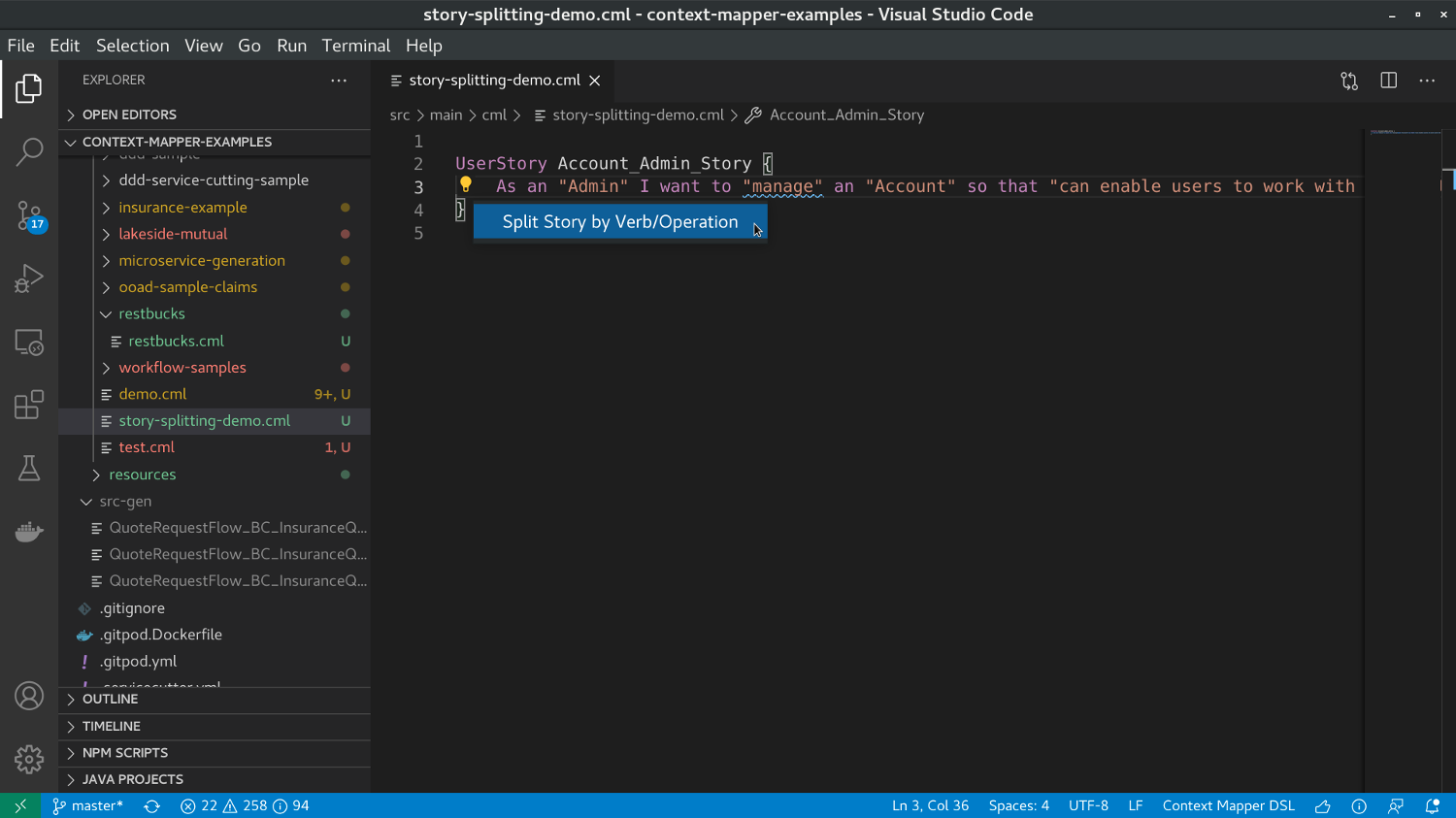
    Story Splitting in VS Code - Example (2)

    Users can then enter multiple new verbs, one after the other:
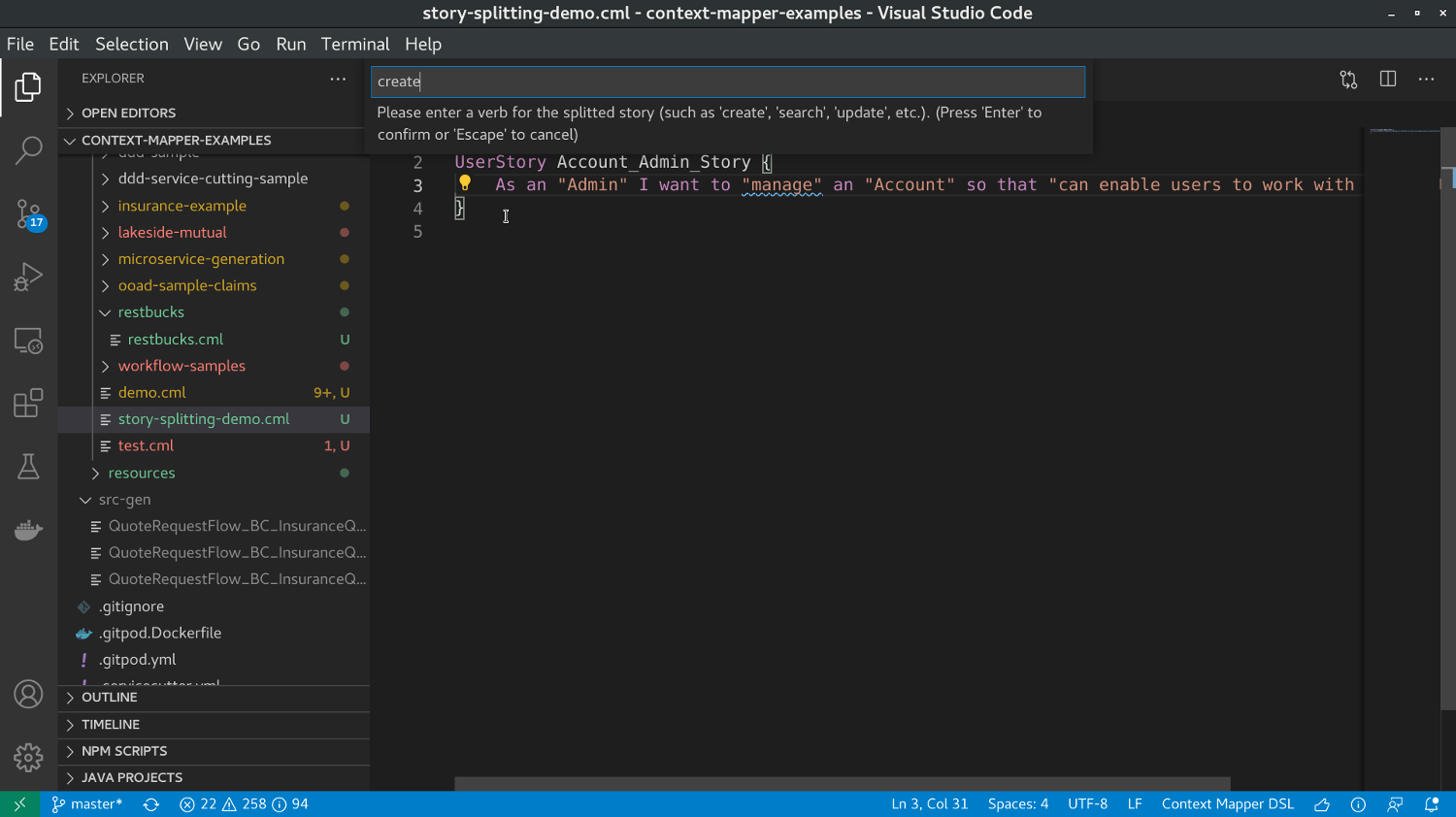
    Story Splitting in VS Code - Example (3)

    Once you entered all desired verbs, you can press ESC and the transformation will be applied. In our case here we entered the verbs create, edit, and cancel. This leads to the following CML result:
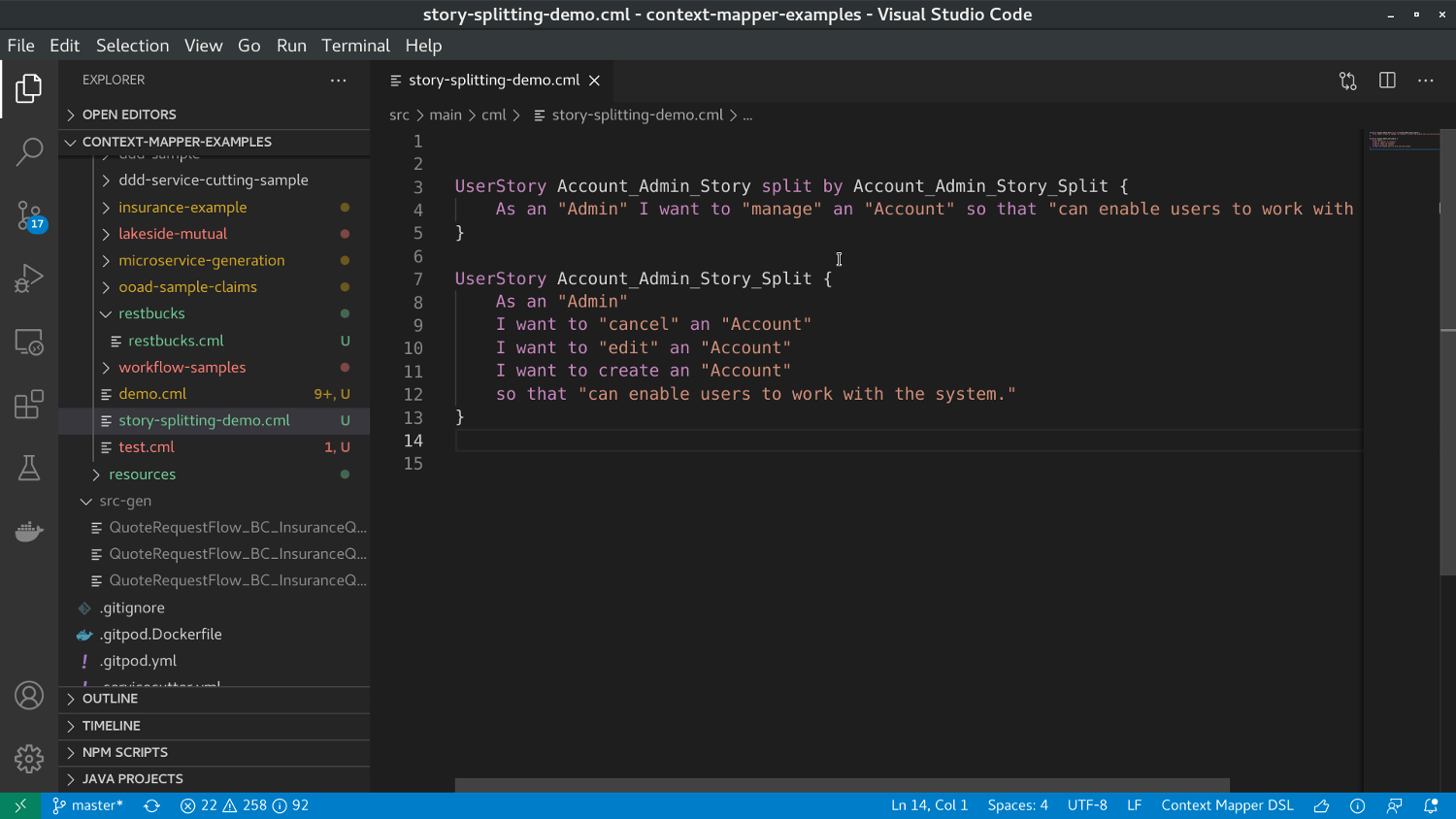
    Story Splitting in VS Code - Example (4)

    The resulting CML model is:

    UserStory Account_Admin_Story split by Account_Admin_Story_Split {
    	As an "Admin" I want to "manage" an "Account" so that "can enable users to work with the system."
    }
    
    UserStory Account_Admin_Story_Split {
    	As an "Admin"
    	I want to "cancel" an "Account"
    	I want to "edit" an "Account"
    	I want to create an "Account"
    	so that "can enable users to work with the system."
    }
    

    With the split by keyword we provide a back-reference so that you still know which story was split by which other story (and how the original story looked like).

    Next Steps

    After you have modelled and split a sufficient amount user stories, you can use our OOAD transformations to derive Subdomains and Bounded Contexts from them. The transformations will always use the split version of a story and ignore the original one!

    Improve this page on GitHub
    ← PreviousRapid Object-oriented Analysis and Design Next →Stakeholder and Value Modelling Transformations
    © 2026 Context Mapper contributors
    • GitHub
    • Get Involved
    • Background & Publications
    • RSS